





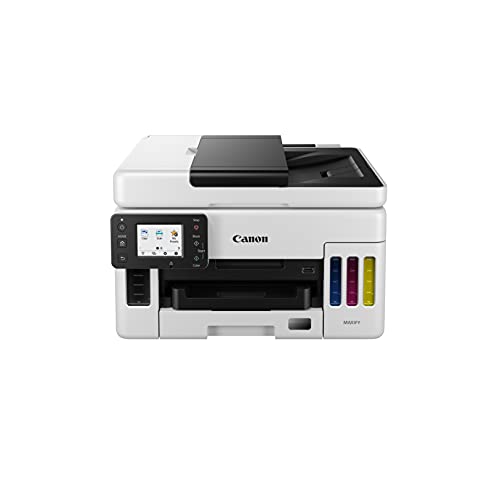


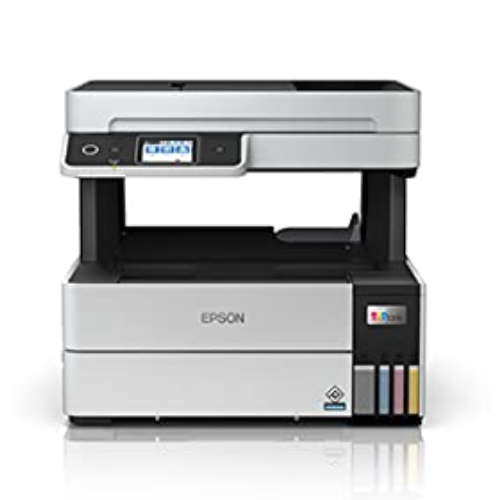
Buy Canon MAXIFY MegaTank GX6070 All-in-One Wireless Ink Tank (Colour) Business Printer for High Volume Document Printing with 2 years Standard Warranty Online at Low Prices in India | Canon Reviews & Ratings
₹48,990.00 (incl. of all taxes)
Sign Up & Earn Rs.300 Digitech Wallet Credit
& save extra money on your next purchase.
Save instantly 1% with Prepaid Orders
via UPI, EMI, Credit/Debit Card, Net Banking, Wallets on min. cart value of ₹3000
Key Features:
About this item Printer Type – Ink Tank, Functionality – All-in-One (Print, Scan, Copy), Printer Output – Color, 6.7cm LCD (2.7in) (Touch-Screen) Connectivity – Wireless, USB, Wired LAN, Mopria, AirPrint, Direct Wireless ; Compatibility: Windows 10 / 8.1 / 7 SP1 (operation can only be guaranteed on a PC with a pre-installed Windows 7 or later), macOS v10.12.6 ~ 10.15, Chrome OS Pages per minute (Upto) – 24.0 ipm (Black), 15.5 ipm (Colour) – As per ISO/IEC 24734 Ideal usage – Business Printer, Recommended monthly print volume: 300 to 2500 pages, Page size supported -A4, A5, A6, B5, LTR, LGL, B-Oficio, M-Oficio, Foolscap, FS, Executive, Envelope; Maximum print resolution – 600 (horizontal) x 1200 (vertical) dpi Compatible Ink Bottle – GI-76 PGBK (Black), GI-76 PG C/M/Y (Cyan, Magenta, Yellow); Page yield- 6000 pages (Black), 14000 pages (Colour)- As per ISO/IEC 24712 standards.The page yield is based on the consumption data from the succeeding ink bottle but not the first ink bottle. Warranty: 2 Years or 100,000 prints whichever is earlier (Including print heads) onsite warranty from the date of purchase. Warranty applicable on manufacturing defects only
Replacement Policy – Digitechshop
| Reason | Period | Policy |
|---|---|---|
| Missing Product | Within 2 days from delivery | Replacement |
| Wrong Product | Within 2 days from delivery | Replacement |
| Damaged Product | Within 2 days from delivery | Replacement |
Verification Process
All replacement requests will be verified by Digitechshop.
Customers must submit valid proof of the issue, such as photos, videos, or unboxing evidence, for verification.
Brand Warranty & Service
Brand assistance for device-related or technical issues is subject to the brand’s official warranty guidelines and service policies.
Customers are requested to contact the nearest authorized service center for further assistance.
During on-call support, you may be asked to upload images, download a diagnostic app, or connect with the brand directly.
Depending on your location, inspection may be carried out at your doorstep or at the nearest brand service center.
The final resolution may take up to 7 working days.
DOA (Dead on Arrival) & Replacement
Return or replacement is only applicable if:
The brand issues a DOA (Dead on Arrival) certificate, or
The part is unavailable for replacement.
If neither condition is met, replacement may not be applicable.
Warranty Handling
For products with a brand warranty, please contact the brand’s authorized service center directly.
For products without a warranty, service and related charges (if applicable) will be as per the brand’s policy.
On-site or off-site service charges are determined solely by the brand.
Exchange Process
If the brand approves an exchange, customers must:
Collect the Job Sheet from the brand’s technician, and
Share it with Digitechshop within 7 days from the delivery date to process the exchange.
Missing Parts/Accessories
For missing parts or accessories:
Please contact the brand’s customer care directly.
If verified by Digitechshop, we may dispatch the missing part, issue a partial refund, or provide a coupon.
Exclusions
Replacement is not applicable in the following cases:
Correct product delivered as per order
Customer’s change of mind or preference-based returns
Quality or performance-related dissatisfaction (covered under brand warranty only)
Free delivery
No shipping charge on this order
Regular delivery also available at less than 6 day(s)
Recently Viewed
You may also like
(Combo)Kyocera Cyan, Magenta, yellow, Black toner 250gm for use in TASKalfa 2552ci-3252ci-4052ci-5052ci-6052ci TASKalfa 2553ci
| Weight | 250 kg |
|---|---|
| Brands | Kyocera printers Kyocera ECOSYS Kyocera TASKalfa Kyocera multifunction devices Buy Kyocera printers online Kyocera document management Kyocera office printers Best Kyocera printer deals Kyocera eco-friendly printers Kyocera copier solutions |
| Color |
Black ,magenta ,Silver ,Yellow |
006R01514 Toner Cartridge – Yellow for XEROX WorkCentre 7525 7530 7535 7545 7556 7830 7835 7845 7855 7970 (110V)
013R00686 / CT351179 Drum Chip Compatible with Xerox AltaLink B8145, B8155, B8170 – 200K Yield
56X HP CF256X Original Toner Cartridge For Hp M436n, M436NDA Printer Copier Machine
A3 Multifunction Hot & Cold Laminator 320
A3+ Borderless EcoTank L18050 | 6 Color Printer | 3D PRINTER | (with ORIGINAL INK) | 2023 MODEL
| Weight | 6 kg |
|---|---|
| Dimensions | 63.1 × 48.29 × 23.4 cm |
| Brands | Epson printers Epson EcoTank Epson L-series printers Epson Workforce Buy Epson printers online Epson inkjet printers Epson accessories Best Epson printer deals Epson projectors Epson photo printers |
| Color |
Black |
| Connectivity | |
| Paper Size |
A3+ |
| Printer Functionality |
Print Only (Single Function) |
| printer Technology | |
| Printer Type | |
| Products by Type |
Amazon Brand – Jam & Honey Baby Rattle Tumbler Set of 2 I Best Learning Toy Pushing Or Holding Toys | Baby Development Toys Amazon.in: Toys & Games
| Style Name |
Bath & Squeeze Toy ,Jumping Toy ,Toddler Toy ,Glow Ball ,Pool Balls |
|---|---|
| Colour |
Bear ,Teddy – Pink ,Blue ,Jumping Giraffe ,Sea Creatures – 10pcs ,Rings & Shapes ,Glow Ball – 6pcs (Assorted) ,Farm Animals – 10pcs ,Pool balls – pastel colour – 150pcs ,Rattle Set – Cow ,Lion ,Assorted – 8 pcs ,Bubbles Wand ,Peppa Pig Hop Ball ,100pcs ,150pcs ,Ramp race car ,Pool balls – pastel colour – 100pcs ,Hop ball ,Crawling Crab ,50pcs ,Jungle Animals – 10pcs ,Bear ,Teddy – Green ,Yellow ,Fruits – 10pcs ,Swirling balls ,Glow Ball – 1pc ,Joy Box (Ramp race ,Stacking cups) ,Assorted – 13 pcs ,Little Pony Hop Ball |
| Brand |
Amazon Brand – Jam & Honey |
| Toy Figure Type |
Play Figure |
| character |
animal toys |
| Model Name |
CE335-2 |
| Model Number |
CE335-2 |
| Country of Origin |
India |
| Customer Reviews |
4.2 4.2 out of 5 stars (3,642) var dpAcrHasRegisteredArcLinkClickAction; 0) + 1); P.when('A', 'cf').execute(function(A) { 0) + 1); 4.2 out of 5 stars |
| Best Sellers Rank |
#106 in Toys & Games (See Top 100 in Toys & Games) #29 in Baby Rattles & Plush Rings |
| Item Type Name |
BABY RATTLE TUMBLER |
| Included Components |
2 tumbler set |
| Item Height |
14 Centimeters |
| Manufacturer |
CIRCLE E RETAIL PVT. LTD. PLOT NO. 42-43, SECTOR- 53, PHASE-V, HSIIDC, INDUSTRIAL ESTATE, KUNDLI, SONIPAT, HARYANA- 131028, CUSOMER CARE- 9350072565, customercare@quixotmultimedia.com, CIRCLE E RETAIL PVT. LTD. PLOT NO. 42-43, SECTOR- 53, PHASE-V, HSIIDC, SONIPAT, HARYANA- 131028 |
| Manufacturer Contact Information |
CIRCLE E RETAIL PVT. LTD. PLOT NO. 42-43, SECTOR- 53, PHASE-V, HSIIDC, INDUSTRIAL ESTATE, KUNDLI, SONIPAT, HARYANA- 131028, CUSOMER CARE- 9350072565, customercare@quixotmultimedia.com |
| Packer Contact Information |
CIRCLE E RETAIL PVT. LTD. PLOT NO 42-43 , SECTOR- 53, PHASE-V, HSIIDC, INDUSTRIAL ESTATE, KUNDLI, SONIPAT, HARYANA- 131028, CUSTOMER CARE- 9350072565, customercare@quixotmultimedia.com |
| Animal Theme |
cow, lion |
| Theme |
Action |
| Collection Name |
Jam & Honey |
| Are Batteries Required |
No |
| Is Autographed |
No |
| Play Activity Location |
Tabletop |
| Material |
Plastic |
| Outer Material Type |
Plastic |
| Item Weight |
353 Grams |
| Number Of Pieces |
2 |
| Size |
One Size |
| Is Assembly Required |
No |
| Manufacturer recommended age |
8 months – 14 years |
| Feature |
Lightweight & Easy to Handle: Perfectly sized for little hands, making it easy for toddlers to hold, shake, and play with independently. |
Amazon.in Buy Canon PIXMA MegaTank GM4070 All in One (Print, Scan, Copy) Inktank Monochrome Printer (Black 6000 Prints) with ADF and Auto Duplex Printing (Print Speed- Black 13.0 ipm) Online at Low Prices in India | Canon Reviews & Ratings
| Printer Type |
Ink Tank |
|---|---|
| Other Special Features of the Product |
Wireless |
| Printer Output Type |
Monochrome |
| Item Dimensions D x W x H |
36.9D x 40.3W x 23.4H Centimeters |
| Controller Type |
Push Button |
| Printing Media Type |
Envelopes, Paper (plain) |
| Scanner Type |
Flatbed |
| Warranty Type |
Limited |
| Ink Color |
Black |
| Resolution |
600 x 1200 DPI |
| Additional Printer Functions |
All In One |
| Control Method |
Touch |
| Compatible Cartridge |
Gi70BK |
| Color Pages per Minute |
13 |
| B&W Pages per Minute |
13 |
| Printer MediaSize Maximum |
A4 |
| Maximum Sheet Capacity |
100 |
| Paper Size |
A4 |
| Network Connectivity Technology |
Wi-Fi |
| Hardware Interface |
Ethernet |
| Dual-sided printing |
Yes |
| Duplex |
Automatic |
| Brand Name |
Canon |
| Model Number |
GM4070 |
| Box Contents |
Printer, Power cord, unit of GI70 black ink bottle, Installation CD, User manual |
| Model Series |
PIXMA |
| Best Sellers Rank |
#23,605 in Computers & Accessories (See Top 100 in Computers & Accessories) #71 in Inkjet Printers |
| Importer Contact Information |
Canon India Pvt Limited.214-218, 2nd floor, Narain Manzil, Barakhamba Road, Connaught Place, New Delhi-110001, India |
| Item Type Name |
Multifunction Printer |
| Item Height |
23.4 Centimeters |
| Manufacturer |
Canon, Canon Inc., 3-30-2, Shimomaruko, Ohta-ku, Tokyo 146-8501, Japan |
| Manufacturer Contact Information |
Canon Inc., 3-30-2, Shimomaruko, Ohta-ku, Tokyo 146-8501, Japan |
| Packer Contact Information |
Canon Inc., 3-30-2, Shimomaruko, Ohta-ku, Tokyo 146-8501, Japan |
| Unit Count |
1 Count |
| Warranty Description |
1 year or 30000 prints, whichever is earlier from the date of purchase- On-site warranty. Free one time installation support-Eligible |
| Max PrintSpeed BlackWhite |
600×1200 dpi |
| Is Electric |
Yes |
| Brand |
Canon |
| Connectivity Technology |
Wi-Fi |
| Printing Technology |
Ink Tank |
| Special Feature |
Wireless |
| Colour |
Black |
| Model Name |
PIXMA |
| Printer Output |
Monochrome |
| Maximum Print Speed (Colour) |
13 |
| Max Print speed Monochrome |
13 |
| Item Weight |
9.2 Kilograms |
| Feature |
Special Features: Optional Color printing, Borderless Printing, High volume printing; Ideal Usage: Home, Home Office ; Included Components: Printer, Power Cord, USB cable, Instruction Manual, 1 bottle of GI 70 Black Ink |
Amazon.in Buy Crucial RAM 8GB DDR4 3200MHz CL22 (or 2933MHz or 2666MHz) Laptop Memory CT8G4SFRA32A Online at Low Prices in India | Crucial Reviews & Ratings
| Size |
16GB ,8GB ,32GB Kit (16GBx2) Dual Rank ,16GB Dual Rank ,8GB Single Rank ,8GB Kit (4GBx2) ,16GB Kit (8GBx2) Dual Rank ,16GB Kit (8GBx2) Single Rank |
|---|---|
| Style Name |
3200 MT/s ,2400 MT/s ,2666 MT/s ,2400MHz ,2666MHz |
| Pattern Name |
Memory 16GB ,8GB DDR4 ,Single ,Memory |
| RAM Memory Technology |
DDR4 |
| Memory Speed |
3200 MHz |
| Compatible Devices |
Laptop |
| Product Features |
Fast Performance |
| Voltage |
1.2 Volts |
| Column Address Strobe Latency |
CL22 |
| Form Factor |
SO-DIMM |
| ProcessorSpeed |
3200 MHz |
| Number Of Pins |
260 |
| RAM Size |
8 GB |
| Brand Name |
Crucial |
| Model Name |
Crucial Memory |
| UPC |
649528903525 |
| Manufacturer |
Crucial, Crucial |
| Global Trade Identification Number |
00649528903525 |
| Customer Reviews |
4.5 4.5 out of 5 stars (92,104) var dpAcrHasRegisteredArcLinkClickAction; 0) + 1); P.when('A', 'cf').execute(function(A) { 0) + 1); 4.5 out of 5 stars |
| Best Sellers Rank |
#4,710 in Electronics (See Top 100 in Electronics) #6 in Memory |
| Importer Contact Information |
M/s Rashi Peripherals Pvt. Ltd.Ariisto House, 5th Floor,Telli Gali, Andheri (East),Mumbai – 400069 |
| Item Type Name |
DDR4 DRAM Memory |
| Box Contents |
DDR4 |
| Item Height |
1.1 Inches |
| Item Weight |
0.02 Pounds |
| Manufacturer Contact Information |
Crucial |
| Packer Contact Information |
MICRON CONSUMER PRODUCTS GROUP(SINGAPORE)A DIVISION OF MICRON SEMICONDUCTOR ASIA OPERATIONSPTE. LTD.1 NORTH COAST DRIVE,SINGAPORE 757432 |
| Unit Count |
9.07 Grams |
| Warranty Description |
10 years |
| Feature |
Install with ease; no computer skills required How-to guides available at Crucial |
Arctic Fox ProMaxe Wireless Mouse | 2400 DPI |2.4 GHz with USB Nano Receiver | High Precision Optical Tracking| for PC/Mac/Laptop – Black Jet
Arctic Fox ProMaxe Wireless Mouse | 2400 DPI |2.4 GHz with USB Nano Receiver | High Precision Optical Tracking| for PC/Mac/Laptop – Cool Gray
Arctic Fox ProMaxe Wireless Mouse | 2400 DPI |2.4 GHz with USB Nano Receiver | High Precision Optical Tracking| for PC/Mac/Laptop – Star White
7 reviews for Buy Canon MAXIFY MegaTank GX6070 All-in-One Wireless Ink Tank (Colour) Business Printer for High Volume Document Printing with 2 years Standard Warranty Online at Low Prices in India | Canon Reviews & Ratings
Clear filtersFrom the manufacturer
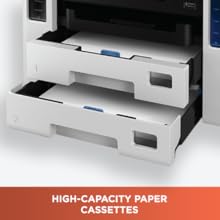
Double your productivity with high-capacity paper cassettes. The GX6070 has a large 350 sheets capacity for continuous and uninterrupted printing.
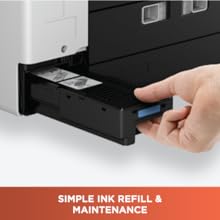
Effortlessly fill the ink without spillage and the need to squeeze the bottle. The unique nozzle & receptacles design prevents any potential refill mistakes.
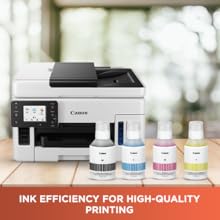
Never worry about the cost of printing ever again! Enjoy high paper yield of up to 21,000 pages in color and up to 9000 pages in black & white made for all your printing needs.
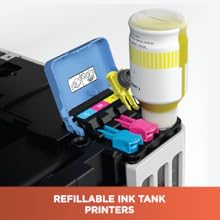
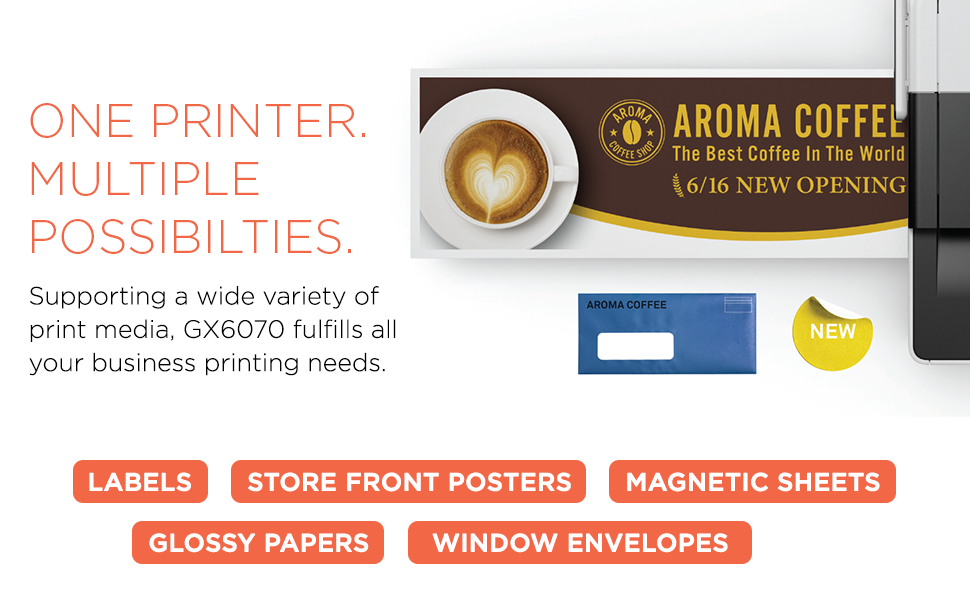
Feature-packed and delivering a richness in colors rivaling laser printer, the MAXIFY printers are perfect fit for small offices & businesses allowing unbridled freedom of printing.

Digitize office work flow and make sharing amongst user easier by sending scanned documents & data to shared network folders, USB storage & email addresses.
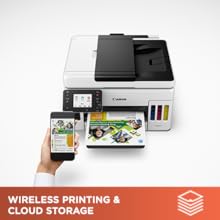
All you need is a wi-fi connection to print documents, webpages, and photos wirelessly, scan & store images to cloud storage.
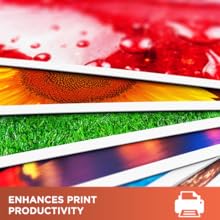
The printer reduces scanning time with the fast, ADF, single pass that allows to scan double-sided documents in one single paper pass.
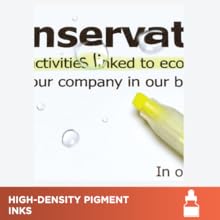
The high-density pigment ink produces sharp, clear & crisp text, and the prints are highlighter and water-resistant.
| Printer Type |
Inkjet |
|---|---|
| Other Special Features of the Product |
Touch Screen |
| Printer Output Type |
Colour |
| Item Dimensions D x W x H |
39.9D x 41W x 25.4H Centimeters |
| Controller Type |
Push Button |
| Printing Media Type |
Paper (plain) |
| Scanner Type |
Sheetfed |
| Maximum Copy Speed Black and White |
24 ppm |
| Display Type |
LCD |
| Compatible Devices |
PC |
| Ink Color |
Cyan, Magenta, Yellow |
| Resolution |
600 x 1200 dpi |
| Additional Printer Functions |
Copy, Scan |
| Control Method |
Touch |
| Color Pages per Minute |
15.5 ppm |
| B&W Pages per Minute |
24 ppm |
| Printer MediaSize Maximum |
5 x 7 inch |
| Paper Size |
4 x 6, 5 x 7, 7 x 10, 8 x 10, 5 x 5 Inches |
| Max PrintResolution Color |
600 x 1200 dpi |
| Max PrintSpeed BlackWhite |
600 x 1200 dpi |
| Dual-sided printing |
Yes |
| Duplex |
Automatic |
| Brand Name |
Canon |
| Model Number |
GX6070 |
| Box Contents |
Printer,Power cord,manual,CD,USB cord, ink bottles-Cyan,Magenta,Yellow,Black |
| Model Series |
MAXIFY |
| Specific Uses For Product |
business |
| Best Sellers Rank |
#36,375 in Computers & Accessories (See Top 100 in Computers & Accessories) #96 in Inkjet Printers |
| Importer Contact Information |
Canon India Pvt Limited.214-218, 2nd floor, Narain Manzil, Barakhamba Road, Connaught Place, New Delhi-110001, India |
| Item Type Name |
Multifunction Printer |
| Item Height |
25.4 Centimeters |
| Manufacturer |
3-30-2, Shimomaruko, Ohta-ku, Tokyo 146-8501, Japan, Canon Inc |
| Manufacturer Contact Information |
3-30-2, Shimomaruko, Ohta-ku, Tokyo 146-8501, Japan |
| Packer Contact Information |
3-30-2, Shimomaruko, Ohta-ku, Tokyo 146-8501, Japan |
| Unit Count |
1 Count |
| Warranty Description |
1 Year Warranty from the date of purchase |
| Network Connectivity Technology |
USB, Wi-Fi |
| Hardware Interface |
USB 2.0 |
| Total USB 2.0 Ports |
1 |
| Total USB Ports |
1 |
| Maximum Copy Resolution Color |
600 x 1200 dpi |
| Maximum Copy Resolution Black and White |
600 x 1200 dpi |
| Brand |
Canon |
| Connectivity Technology |
USB, Wi-Fi |
| Printing Technology |
Inkjet |
| Special Feature |
Touch Screen |
| Colour |
White and Black |
| Model Name |
MAXIFY |
| Printer Output |
Colour |
| Maximum Print Speed (Colour) |
15.5 ppm |
| Max Print speed Monochrome |
24 ppm |
| Item Weight |
11.6 Kilograms |
| Feature |
Warranty: 2 Years or 100,000 prints whichever is earlier (Including print heads) onsite warranty from the date of purchase. Warranty applicable on manufacturing defects only |
7 reviews for Buy Canon MAXIFY MegaTank GX6070 All-in-One Wireless Ink Tank (Colour) Business Printer for High Volume Document Printing with 2 years Standard Warranty Online at Low Prices in India | Canon Reviews & Ratings
Clear filters-
Suresh B.Suresh B. –
Rated 5 out of 55.0 out of 5 starsA Big Beautiful Printer
The printer came in proper packaging with a plastic protective wrapper around the Canon box. The box contained all the items mentioned, i.e. Printer, Ink Bottles, Power Cable, USB cable (to connect with PC/laptop), Manuals, and a installation CD (you can install the drivers directly from Canon website instead of the CD).*Ink bottles are full bottles – 170 ml Black, and 135 ml each of Cyan, Magenta, and Yellow – so no need to purchase ink at least for first few months.The first page of the Canon manual gives proper instructions on how to set up the printer. If you follow that carefully, you can install the printer yourself. If you are not sure, you can book a call with Canon (or ask Amazon Customer Care for help regarding that).I did the set up myself, the whole process took around 20-30 minutes. I connected the printer directly to PC with the provided cable. There is a wi-fi connectivity option, but for now I won’t be using it, so didn’t try that.The printer looks sturdy and overall material quality looks quite good. Hopefully it will work smoothly for years to come.I did run a few test prints (simple copy, back to back copy, color document prints on plain paper and a photo print on glossy photo paper). The quality of prints is good. Speed is satisfactory; not very fast, but not slow either. Document prints are excellent. Color documents also come out well. Remember to set paper type (plain/glossy/mat etc) and photo quality (standard/high etc) as per your needs. ADF (auto document feeder at top) works well.For photo print, if you use a glossy photo paper and set the quality to ‘High’ you will get quite good prints (usable for personal/family/friends photo prints).So far so good. My main reason for buying this printer is to print large number of booklets etc, so only the time will tell how that works out. Will update this review if I face any issues.**The attached photos**(1) Printer just after installation (2) Filling the ink (to get an idea of the size of ink bottle)(3) Color print of a book cover and the book itself kept side by side; note that the colors are quite faithful
2 people found this helpful


-
Pinky P. –
Rated 1 out of 51.0 out of 5 starsNo Duplex Scanning
This doesnt support double sided scanning
One person found this helpful
-
avichal dixitavichal dixit –
Rated 5 out of 55.0 out of 5 starsCanon Maxify review and proper maintenance
The Canon 6070 is undoubtedly one of the best printers in its segment. It offers reliable performance, crisp printing, and cost-efficient output, making it ideal for both home and office use. However, to ensure flawless and long-lasting operation, there are a few important practices every user should follow:✅ Key Usage Tips for Best Performance1. Regular Printing – Print at least 100 pages per month. This prevents ink from drying in the nozzles and keeps the print head active.2. Ink Filling Precaution – Never fill the ink tank completely to the top. Always leave about 1 block/level empty. This allows the vacuum mechanism to work correctly and prevents ink from being pulled back, which could empty the print head.3. Use Original Ink – Always use genuine Canon ink bottles. They not only ensure the best print quality but also protect the print head and extend the printer’s life.4. Cap Maintenance – Open and close the ink-filling cap at least once every 15 days or after every 100 pages printed. This helps in maintaining proper air balance in the tank and prevents ink flow issues.⚙️ Durability & ReliabilityWith the above precautions, the Canon 6070 can easily deliver up to 1,00,000 pages of smooth printing without major issues.It is built for heavy-duty usage, but like all ink-tank printers, regular care ensures maximum output.📑 Warranty & ServiceStandard warranty covers 2 years, but it is strongly recommended to opt for an additional 2 years extended warranty, giving you a total of 4 years of worry-free usage.⭐ Final VerdictThe Canon 6070 is a high-quality, reliable, and cost-effective printer in its category. With the right maintenance habits, it can outperform competitors and serve flawlessly for years. It’s an excellent choice for users who want long-term durability and professional print quality.

-
Placeholder –
Rated 4 out of 54.0 out of 5 starsGx6070 printer all in one
Very good printer. I honestly review for this but this under 30k . My 1month usages this best for all work, mind this not photo printer but heavy work printer , print quality great, connectivity also good, color quality also good, photo print not like studio but it good. Print speed
-
Kavita –
Rated 5 out of 55.0 out of 5 starsExcellent Printer!
Best Printer for Big Offices and Corporate companies.Excellent print quality.Will definitely recommended this model.Super PerformanceHigh speed
4 people found this helpful
-
Pavel Bawa –
Rated 1 out of 51.0 out of 5 starsDefective
Defective piece
3 people found this helpful
-
Gopalakrishnan N –
Rated 1 out of 51.0 out of 5 starsTotally waste product
Had to change the head twice within 3 months, getting lines within a month, can only able to print upto 1000 pages on color for a single refill, don’t even thing to buy it, please buy other pixma printers.
5 people found this helpful


Suresh B.Suresh B. –
A Big Beautiful Printer
The printer came in proper packaging with a plastic protective wrapper around the Canon box. The box contained all the items mentioned, i.e. Printer, Ink Bottles, Power Cable, USB cable (to connect with PC/laptop), Manuals, and a installation CD (you can install the drivers directly from Canon website instead of the CD).*Ink bottles are full bottles – 170 ml Black, and 135 ml each of Cyan, Magenta, and Yellow – so no need to purchase ink at least for first few months.The first page of the Canon manual gives proper instructions on how to set up the printer. If you follow that carefully, you can install the printer yourself. If you are not sure, you can book a call with Canon (or ask Amazon Customer Care for help regarding that).I did the set up myself, the whole process took around 20-30 minutes. I connected the printer directly to PC with the provided cable. There is a wi-fi connectivity option, but for now I won’t be using it, so didn’t try that.The printer looks sturdy and overall material quality looks quite good. Hopefully it will work smoothly for years to come.I did run a few test prints (simple copy, back to back copy, color document prints on plain paper and a photo print on glossy photo paper). The quality of prints is good. Speed is satisfactory; not very fast, but not slow either. Document prints are excellent. Color documents also come out well. Remember to set paper type (plain/glossy/mat etc) and photo quality (standard/high etc) as per your needs. ADF (auto document feeder at top) works well.For photo print, if you use a glossy photo paper and set the quality to ‘High’ you will get quite good prints (usable for personal/family/friends photo prints).So far so good. My main reason for buying this printer is to print large number of booklets etc, so only the time will tell how that works out. Will update this review if I face any issues.**The attached photos**(1) Printer just after installation (2) Filling the ink (to get an idea of the size of ink bottle)(3) Color print of a book cover and the book itself kept side by side; note that the colors are quite faithful
2 people found this helpful
Pinky P. –
No Duplex Scanning
This doesnt support double sided scanning
One person found this helpful
avichal dixitavichal dixit –
Canon Maxify review and proper maintenance
The Canon 6070 is undoubtedly one of the best printers in its segment. It offers reliable performance, crisp printing, and cost-efficient output, making it ideal for both home and office use. However, to ensure flawless and long-lasting operation, there are a few important practices every user should follow:✅ Key Usage Tips for Best Performance1. Regular Printing – Print at least 100 pages per month. This prevents ink from drying in the nozzles and keeps the print head active.2. Ink Filling Precaution – Never fill the ink tank completely to the top. Always leave about 1 block/level empty. This allows the vacuum mechanism to work correctly and prevents ink from being pulled back, which could empty the print head.3. Use Original Ink – Always use genuine Canon ink bottles. They not only ensure the best print quality but also protect the print head and extend the printer’s life.4. Cap Maintenance – Open and close the ink-filling cap at least once every 15 days or after every 100 pages printed. This helps in maintaining proper air balance in the tank and prevents ink flow issues.⚙️ Durability & ReliabilityWith the above precautions, the Canon 6070 can easily deliver up to 1,00,000 pages of smooth printing without major issues.It is built for heavy-duty usage, but like all ink-tank printers, regular care ensures maximum output.📑 Warranty & ServiceStandard warranty covers 2 years, but it is strongly recommended to opt for an additional 2 years extended warranty, giving you a total of 4 years of worry-free usage.⭐ Final VerdictThe Canon 6070 is a high-quality, reliable, and cost-effective printer in its category. With the right maintenance habits, it can outperform competitors and serve flawlessly for years. It’s an excellent choice for users who want long-term durability and professional print quality.
Placeholder –
Gx6070 printer all in one
Very good printer. I honestly review for this but this under 30k . My 1month usages this best for all work, mind this not photo printer but heavy work printer , print quality great, connectivity also good, color quality also good, photo print not like studio but it good. Print speed
Kavita –
Excellent Printer!
Best Printer for Big Offices and Corporate companies.Excellent print quality.Will definitely recommended this model.Super PerformanceHigh speed
4 people found this helpful
Pavel Bawa –
Defective
Defective piece
3 people found this helpful
Gopalakrishnan N –
Totally waste product
Had to change the head twice within 3 months, getting lines within a month, can only able to print upto 1000 pages on color for a single refill, don’t even thing to buy it, please buy other pixma printers.
5 people found this helpful